
ADP party membership registration online is the process of joining the Action Democratic Party (ADP) in Nigeria through its digital membership platform. Nigerians who want to become party members can register online by providing their personal details, location information, and other required information.
The online registration system allows interested Nigerians to create a membership profile, access their account, and participate in party activities after completing registration.
What is ADP Party Membership Registration?
ADP membership registration is the official process of becoming a recognised member of the Action Democratic Party (ADP).
The registration allows eligible Nigerians to join the party structure and participate in activities such as:
- Party meetings
- Internal party activities
- Ward-level participation
- Party programmes and engagements
The Action Democratic Party provides an online registration platform where Nigerians can submit their membership information.
What is the Official ADP Membership Registration Portal?
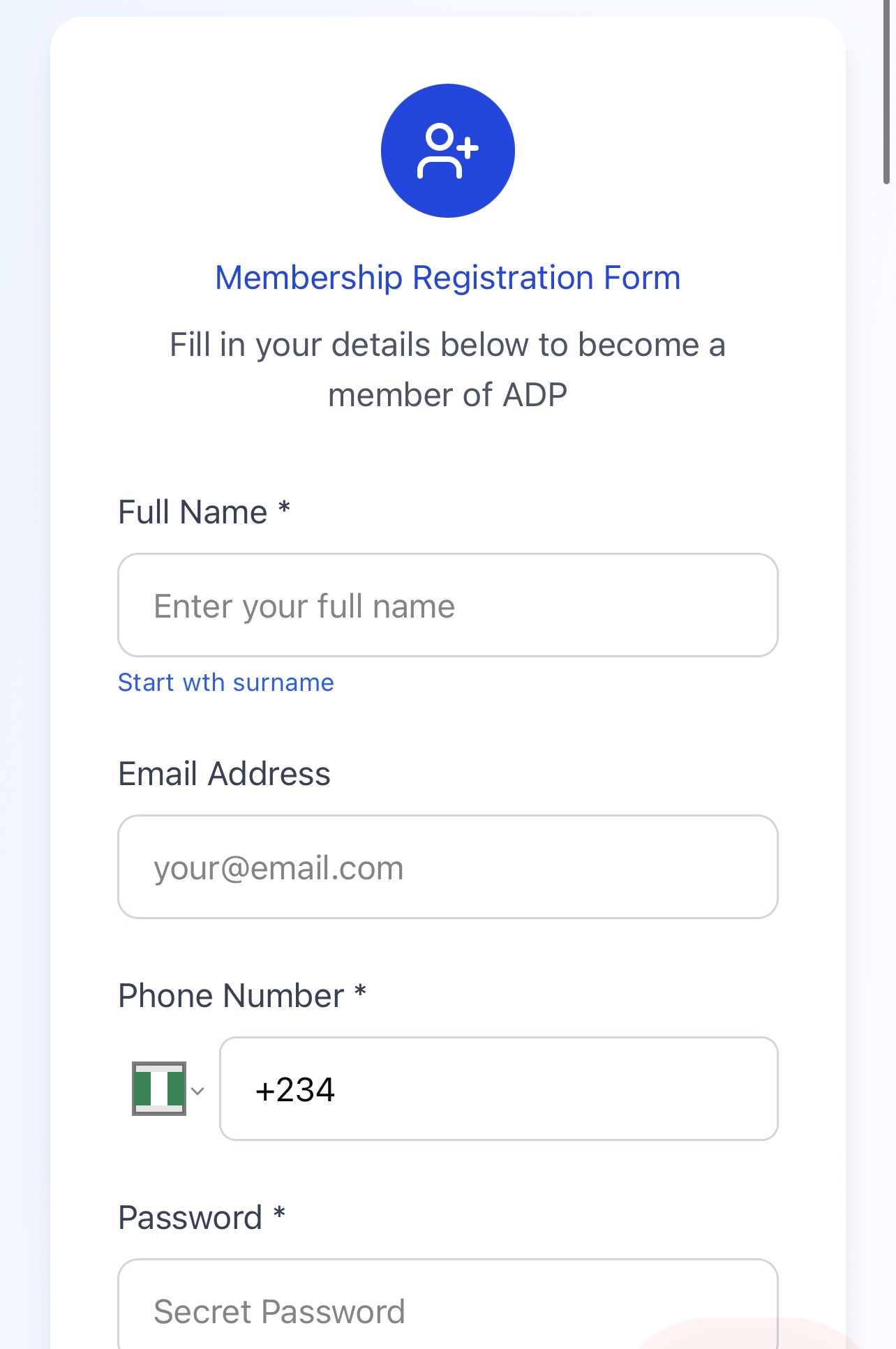
The official ADP membership registration portal is:
ADP Membership Registration Portal: https://adp.ng/register/
Applicants should use the official party platform when creating an account and submitting membership details.
Avoid unofficial websites that request unnecessary payments or personal information.
How to Register for ADP Party Membership Online
Follow these steps to complete your ADP membership registration:
Visit the ADP registration portal
Open the official ADP membership registration page and select the registration option.
Fill in your personal information
Provide the required details, which may include:
- Full name
- Email address
- Phone number
- WhatsApp number
- Date of birth
- Gender
- Occupation
Ensure all information provided is correct.
Provide voter and location details
Applicants may be required to provide information such as:
- NIN number
- Voter’s card number
- State
- Local Government Area
- Ward
- Polling Unit
- Residential address
These details help organise members within the party structure.
Create your account password
Create a password that you can remember and keep your login details secure.
Submit your registration
Review your information before completing the registration process.
After successful registration, your membership details can be used to access your account.
How to Login to the ADP Membership Portal
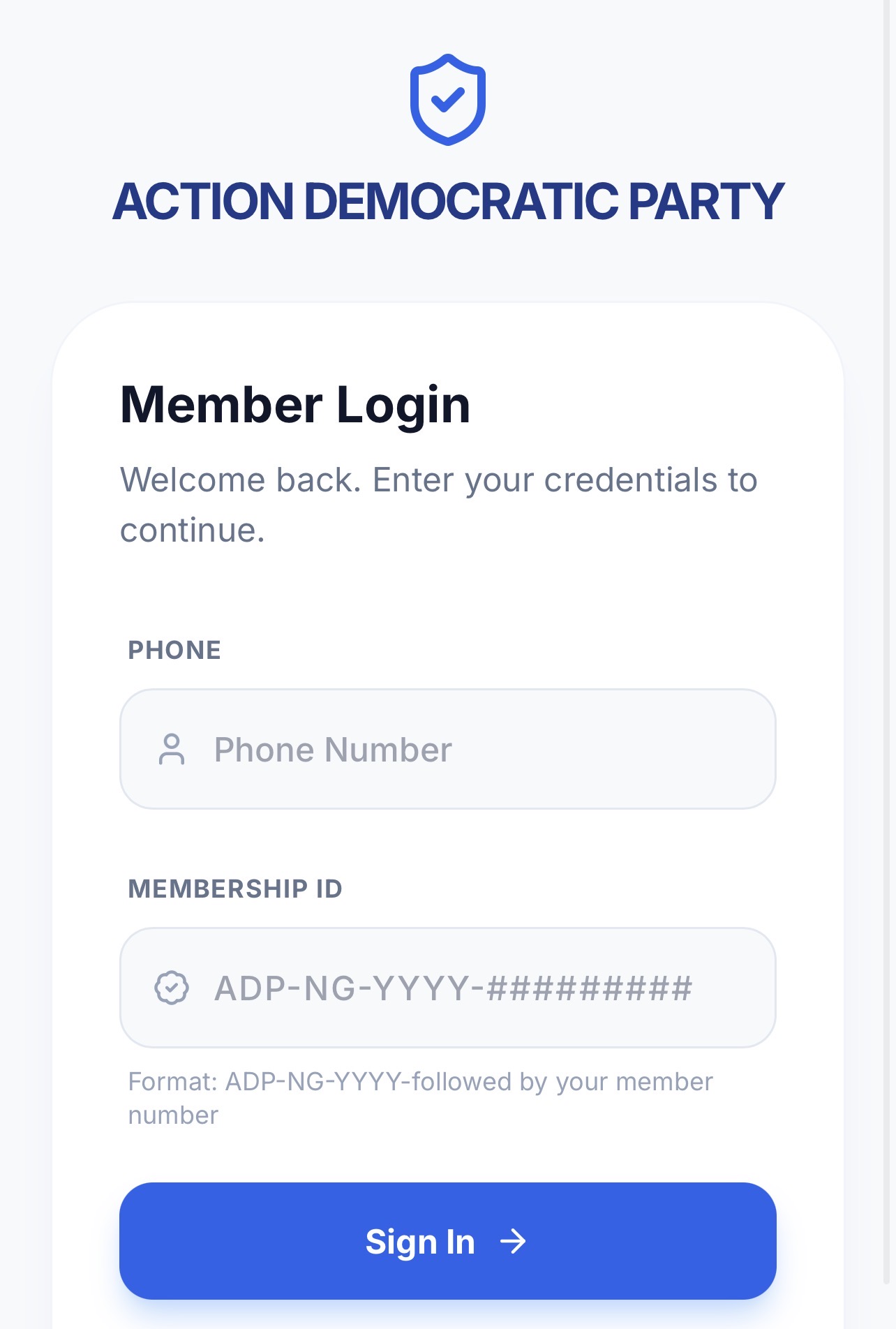
Registered ADP members can login to their account through the party membership portal.
Follow these steps:
Open the ADP member login page
Visit the official ADP membership dashboard.
Enter your login details
Provide your:
- Phone number or membership ID
- Password
The ADP member portal allows registered users to access their membership account.
Access your member dashboard
After successful login, members may be able to:
- View their membership profile
- Manage account details
- Access party updates
- Check membership information
Portal features may depend on the services available to members.
How to Get ADP Membership ID
After completing registration, members may receive a membership identification number or login details for accessing the member portal.
The membership ID may be required when signing into the ADP dashboard.
If you cannot find your membership details:
- Check your registration confirmation
- Use the login recovery option if available
- Contact ADP support through official channels
Is There an ADP Membership Registration Form PDF?
The ADP online registration system is designed for applicants to complete membership registration digitally.
Applicants searching for an ADP membership registration form PDF should confirm whether the party has provided a downloadable form during the current registration exercise.
If a PDF form is made available, it should only be downloaded from the official ADP platform.
Avoid downloading membership forms from unknown websites.
What Information Is Needed for ADP Membership Registration?
Applicants should prepare the following information before starting registration:
- Full name
- Active phone number
- Email address
- Date of birth
- Gender
- Occupation
- NIN details
- Voter information
- State and LGA details
- Ward information
- Residential address
Providing accurate information helps prevent problems during account creation.
Who Can Register as an ADP Member?
Nigerians who meet the party’s membership requirements can register to become members.
Interested individuals should provide accurate personal information and agree to follow the party’s membership guidelines during registration.
What If I Forgot My ADP Portal Login Password?
If you cannot access your ADP membership account:
- Check that your login details are correct
- Use the available password recovery option
- Confirm that you are using the same details used during registration
Do not share your password with another person.
Common ADP Membership Registration Problems
Registration page not opening
Possible solutions:
- Check your internet connection
- Try another browser
- Refresh the page and try again later
Unable to submit registration
Check that:
- All required fields are completed
- Your details are entered correctly
- Uploaded information meets the requirements
Login details not working
Confirm that you are using the correct phone number, membership ID, or password.
How to Stay Safe During ADP Online Registration
When registering online:
- Use only the official ADP website
- Do not share your password
- Avoid paying unofficial agents
- Confirm information before submitting
- Keep your membership details secure
Online registration should be completed directly by the applicant.
ADP Membership Registration Summary
The ADP online membership registration process allows Nigerians to join the Action Democratic Party through a digital platform.
To register successfully:
- Visit the official ADP registration portal
- Complete your personal information
- Provide required voter and location details
- Create your account
- Keep your login details safe
Members who have already registered can access the ADP membership portal using their login information to manage their account and view available updates.
1 Trackback / Pingback